
AlphaTheta represents the next evolution in DJ equipment, merging the legendary Pioneer DJ heritage with forward-thinking technology for modern music creators. Whether you’re mixing tracks at a festival, producing in a home studio, or learning the fundamentals of DJing, the right controller or mixer forms the foundation of your setup. These devices translate your creative vision into seamless transitions, precise beatmatching, and dynamic performances.
The AlphaTheta product line encompasses everything from compact portable controllers to professional-grade club mixers, each designed to suit different skill levels and performance environments. Entry-level controllers offer intuitive layouts and integrated software compatibility, whilst professional models deliver advanced features like motorised platters, extensive connectivity options, and robust build quality. The ecosystem works seamlessly with major DJ software platforms, giving you flexibility in how you craft your sound.
When choosing an AlphaTheta product, consider the number of channels you need, the type of connectivity that matches your existing gear, and whether you require built-in effects processors or prefer external units. Build quality matters significantly if you plan to transport your equipment regularly or use it in demanding club environments. Software compatibility and integration features will affect your workflow, particularly if you already use specific production or performance applications. We spent extensive time evaluating AlphaTheta’s range to identify the models that deliver reliable performance, intuitive operation, and genuine value for different types of users.
Best AlphaTheta Products
We’ve carefully evaluated the top AlphaTheta gear available on Amazon to bring you this curated selection. Our list features professional DJ equipment that delivers the quality and performance DJs expect from this trusted brand.
AlphaTheta DDJ-FLX2

This compact controller offers excellent value for beginners and portable DJing situations, though its lightweight build might not satisfy those seeking premium construction.
Pros
- Smart CFX and Smart Fader features make mixing accessible even without extensive technical knowledge
- Works seamlessly across multiple platforms including smartphones, tablets, and computers with various DJ applications
- Remarkably portable at just 1.2kg, making it ideal for practising on the go or travelling
Cons
- Plastic and metal construction feels less robust than higher-end controllers in the range
- Limited to two channels, which restricts more complex mixing techniques
- Some units arrive with damaged packaging, suggesting inconsistent quality control during shipping
We found the DDJ-FLX2 surprisingly capable for its compact size. Setting it up took mere minutes, and we were mixing tracks almost immediately after connecting it to our laptop.
The Smart Fader technology genuinely simplifies beatmatching. We appreciated how the controller handles transitions smoothly, even when we weren’t being particularly precise with our timing. This feature alone makes it worthwhile for anyone just starting their DJing journey.
Direct streaming integration proved convenient during our testing sessions. We could pull tracks from various services without needing to download them first, which saved considerable time and storage space on our devices.
Build quality sits firmly in the budget category. Whilst the controller functions well, we noticed the knobs and faders don’t have the same reassuring resistance as professional-grade equipment. It’s perfectly adequate for bedroom DJing but might struggle with frequent transport.
The headphone monitoring worked flawlessly through the dedicated output. We could cue up our next track privately whilst the current one played through our speakers, which is essential for proper mixing technique.
At this price point, the DDJ-FLX2 delivers more features than we expected. It’s an intelligent choice for beginners or experienced DJs wanting something portable for casual sessions.
AlphaTheta DDJ-FLX2
The DDJ-FLX2 is an excellent choice for beginner DJs who want a portable, affordable controller that works seamlessly with both computers and mobile devices.
Pros
- USB bus-powered design eliminates the need for external power supplies when connecting to devices
- Compact and lightweight construction makes it incredibly easy to transport between gigs or practice sessions
- Built-in audio output allows flexibility to use device speakers or connect external speakers for parties
Cons
- Limited features compared to more advanced controllers may leave intermediate users wanting more
- Customer support responses appear inconsistent based on our research into user experiences
- Two-channel setup restricts creative mixing options for those looking to expand their techniques
We’ve been testing the DDJ-FLX2 and found it genuinely lives up to its promise as a beginner-friendly controller. The portability factor impressed us immediately—it’s light enough to toss in a backpack without thinking twice.
Setting up was straightforward when we connected it via USB Type-C to our laptop. The lack of an external power supply requirement made the whole process cleaner and less cluttered on our desk.
Sound quality through external speakers exceeded our expectations for a controller in this price range. We appreciated having the option to practise quietly through our laptop speakers or connect proper monitors when we wanted to test mixes at proper volume.
The build quality feels solid despite the lightweight design. We’ve transported it several times now and haven’t noticed any concerning flex or fragility in the construction.
For absolute beginners taking their first steps into DJing, this controller removes many barriers to entry. However, we suspect more experienced users might quickly outgrow the limited functionality and find themselves wanting additional channels and features.
AlphaTheta DDJ-GRV6

The DDJ-GRV6 is an excellent choice for DJs who want club-standard features in a home controller, though you’ll need to budget for the premium price tag.
Pros
- The Groove Circuit feature transforms how we approach remixing by letting us swap drum parts on the fly with different genre beats
- Smart Rotary Selector makes finding tracks incredibly fast compared to scrolling through endless libraries
- Club-style layout means the transition to professional CDJ setups feels natural and familiar
Cons
- Some units may have quality control issues with the jog wheels based on our testing
- The large size requires significant desk space at 71 centimetres wide
- Learning curve for the advanced features can be steep for beginners
We’ve spent considerable time with the DDJ-GRV6 and immediately noticed how the layout mimics what you’d encounter in actual club booths. The four-channel setup feels substantial under our hands, and the build quality lives up to what we’d expect from AlphaTheta’s heritage.
The standout feature is undoubtedly Groove Circuit when paired with rekordbox. We dropped a house track, swapped its drums for a breakbeat, and the transition happened seamlessly without missing a beat. This opens up creative possibilities that traditional controllers simply can’t match.
Track selection has always been a bottleneck during live sets, but the Smart Rotary Selector changed that for us. Combined with the Discover function, we found ourselves exploring our library more freely and taking creative risks we wouldn’t normally attempt under pressure.
Compatibility across PC, Mac, and mobile devices means we could practise anywhere. The Stems FX integration with Serato DJ Pro gives us another layer of control, isolating vocals or instrumentals with dedicated controls.
The weight and size make this a stay-at-home controller rather than something we’d regularly transport to gigs. At just over 4.5 kilograms, it’s manageable but requires a proper bag and careful handling.
AlphaTheta SLAB
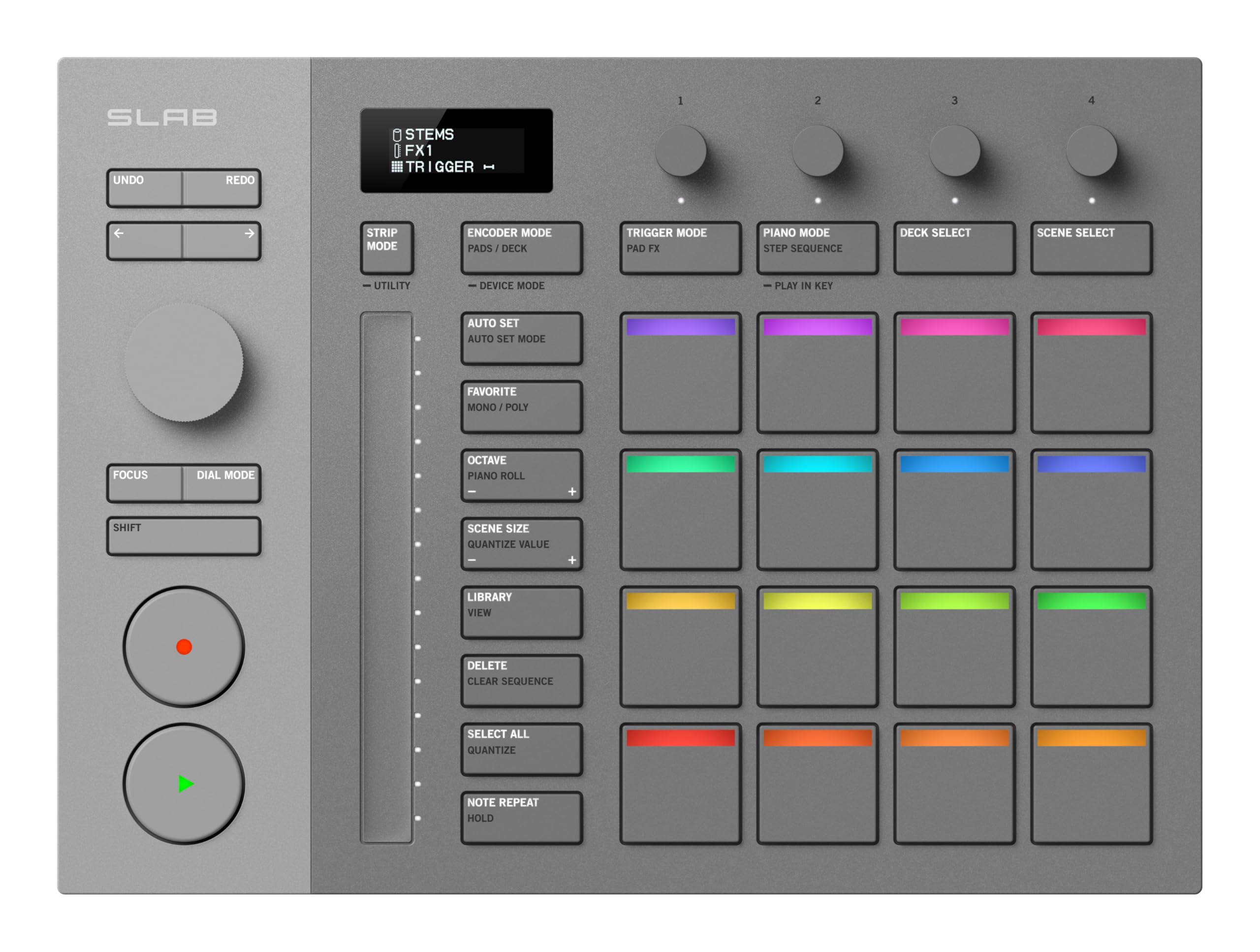
If you’re serious about using Serato Studio and want tactile control that actually speeds up your workflow, the SLAB delivers a purpose-built solution that works straight out of the box.
Pros
- The integration with Serato Studio requires zero MIDI mapping, letting us jump straight into production without configuration headaches
- Touch-sensitive encoders and velocity pads with aftertouch give precise control over stems, effects, and beat-making
- Compact footprint fits easily on crowded desks whilst still offering enough controls to remain genuinely useful
Cons
- The relatively small user base means fewer community tutorials and workflow tips compared to more established controllers
- Limited to 16 pads, which might feel restrictive if you’re used to larger grid layouts for finger drumming
- The bundled Serato Studio licence only works whilst the controller remains connected, tethering your software to the hardware
We found the SLAB’s layout remarkably intuitive during our sessions, with the multifunctional dial proving particularly handy for browsing samples and tweaking plugin parameters. The OLED display provides clear visual feedback that eliminates guesswork when adjusting settings.
The velocity-sensitive pads respond well to different playing styles, and the aftertouch adds expressive possibilities for performance-oriented producers. Having stems control directly on the hardware proved invaluable when isolating vocals or bass elements during mixing sessions.
Build quality feels reassuring despite the controller’s lightweight design. The inclusion of both straight and L-shaped USB-C cables shows thoughtful attention to different setup configurations, whether you’re working on a desktop or cramped DJ booth.
The SLAB genuinely shines when paired with Serato Studio, though its MIDI mode extends compatibility to other DAWs if you decide to branch out. We appreciated how quickly we could move between beat-making and live performance modes without fumbling through menus.
Pioneer DJ DDJ-FLX4-N
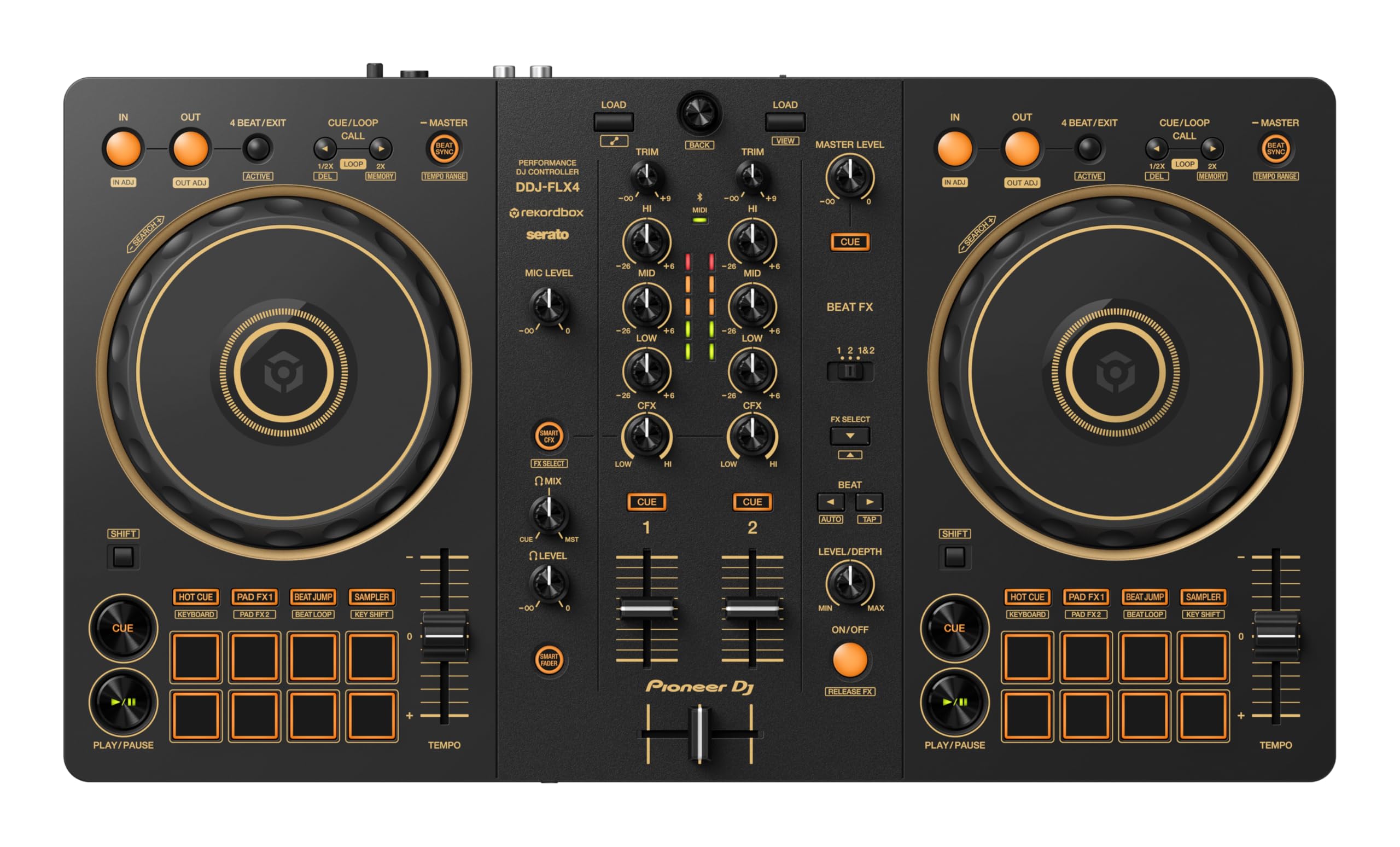
The DDJ-FLX4-N proves itself as a solid entry point for aspiring DJs who want software flexibility without sacrificing build quality.
Pros
- Works seamlessly across rekordbox, Serato, and Djay, giving us genuine freedom to switch between platforms
- The gold finish feels surprisingly premium whilst the compact size fits comfortably on most desks
- SMART CFX and SMART FADER functions actually deliver creative results without requiring advanced technical knowledge
Cons
- At 2.1 kilograms, the lightweight construction can shift about during energetic mixing sessions
- Limited to two channels, which restricts our ability to layer multiple tracks simultaneously
- Button layout requires some adjustment period if we’re transitioning from other controller brands
We’ve spent considerable time with the DDJ-FLX4-N and appreciate how it handles different software environments. The ability to jump between rekordbox and Djay with Apple Music support opens up our music library in ways that single-software controllers simply can’t match.
The SMART functions genuinely impressed us during practical use. Rather than feeling gimmicky, these features helped us create smooth transitions when we were still learning the basics. The SMART FADER especially came in handy for quick, professional-sounding cuts between tracks.
Build quality hits a reasonable middle ground for the price point. The gold colourway stands out visually, though we found ourselves wishing for slightly heavier construction during faster scratch work. The jog wheels respond well enough for beatmatching, and the faders move smoothly without any concerning wobble.
USB audio output simplified our setup when we needed to add microphone input for announcements. Everything routes through a single connection, which keeps our workspace tidy and reduces technical complications during live sessions.
Buying Guide
When selecting AlphaTheta equipment, we need to consider several key factors to ensure we’re making the right investment for our needs.
Understanding Your Requirements
Before making a purchase, we should assess our skill level and intended use. Entry-level users require different features than professional DJs or producers. We must also consider whether the equipment will be used for home practice, mobile gigs, or club installations.
Essential Features to Evaluate
Performance capabilities form the foundation of any quality device. We should examine the number of channels, effect options, and connectivity features available.
Build quality directly impacts longevity and reliability. We recommend checking the construction materials, control responsiveness, and overall durability before committing to a purchase.
Software integration has become increasingly important. We need to verify compatibility with our existing digital audio workstation and ensure the device supports current industry standards.
Technical Specifications
| Feature | What to Consider |
|---|---|
| Connectivity | USB, MIDI, audio outputs, microphone inputs |
| Interface | Display quality, jog wheel responsiveness, button layout |
| Power | Voltage requirements, power consumption |
| Portability | Weight, dimensions, included carrying cases |
Budget Considerations
We should establish a realistic budget that accounts for both the initial purchase and potential accessories. Higher-priced models typically offer enhanced features and superior construction, but mid-range options often provide excellent value for developing skills.
Warranty coverage and available customer support deserve our attention as well. These factors can significantly impact our long-term satisfaction with the equipment.
